

You can use Beecardia's platform to order remote ECG interpretation from board-certified cardiologists. If you're unfamiliar with this feature, you can learn more about it here.
We've now added a new panel, the "Report orders" panel to help you manage those orders. Under this panel you can see all of your orders, view reports, cancel orders and download invoices.
You can access it from the "Report orders" link at the top of the page.
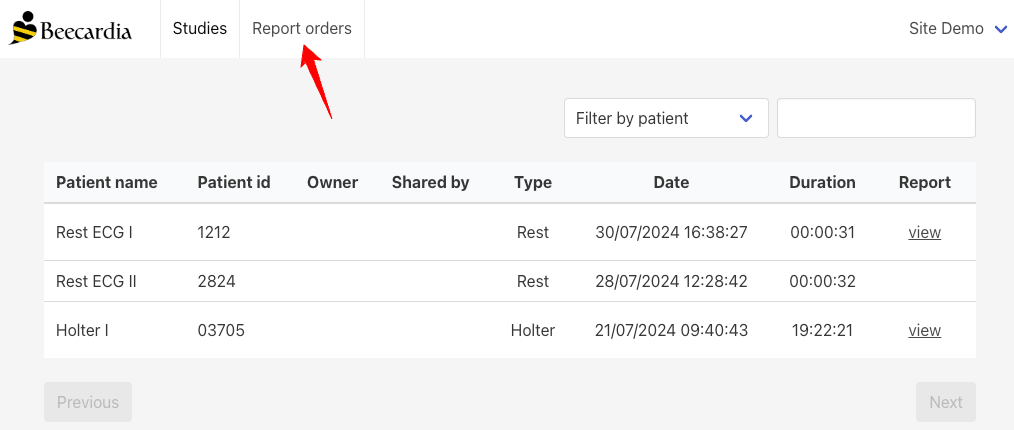
After clicking on "Report orders" you'll get the following page.
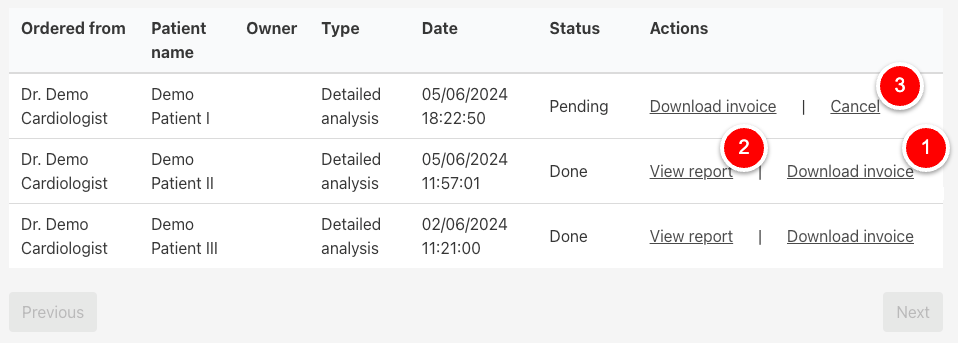
Here you can see all of your previous orders, and:
- Download the invoice (1) when applicable
- View the report when it's ready (2)
- Cancel the report order if it was made by mistake (3) as long as it’s still under the “Pending” status
The “Report Orders” panel is designed to give you complete control over your ECG orders, making it easier than ever to track and manage your requests.
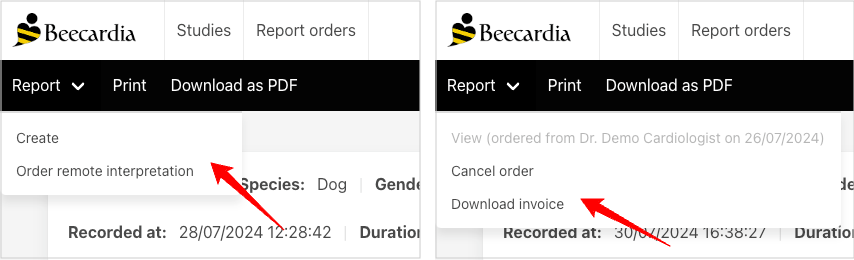
In addition, you can perform all of the actions above from the study page itself under the new "Report" menu:
By simplifying the management of remote ECG interpretations, we hope to provide you with the tools you need to deliver the best possible care to your patients.
If you have any suggestions or comments, please don’t hesitate to reach out!