

When uploading a study you might want to add some extra data like x-ray, blood test results, audio remarks, etc. This might be especially helpful when ordering a remote interpretation, as you can share more information that might help to better interpret the study.
We got many requests to support such use cases, so let me introduce - attachments.
Using our mobile application you can now attach images, videos, documents, audio, etc to any study that you perform. You can even upload attachments as “stand-alone” studies.
In order to add an attachment, you need to open the main menu in the mobile app and click on “Attachments”.
You have three options to add the attachments:
- A new study - this will create an attachments study, so the study will only contain attachments. It can be useful if, for example, you want to save a document or a photo as a separate study for a patient.
- Existing study - attach the data to an existing study. For example, add an x-ray photo to an ECG study.
- Last study - a shortcut to add the attachment to the last study you’ve performed.
After choosing where to add the attachments, you’ll get the following page:
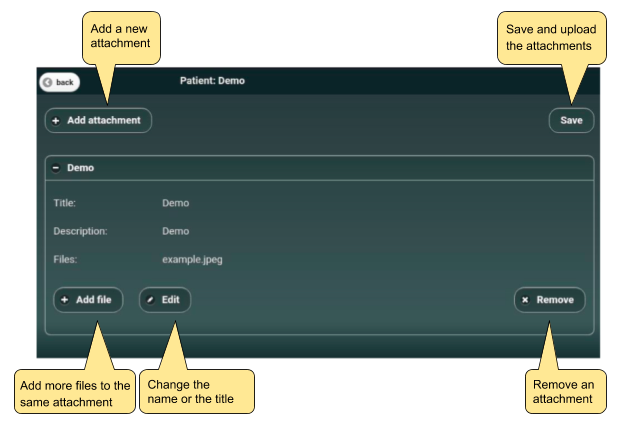
Once you finish attaching and click on “Save” all the attachments will upload to the cloud and will appear on the study page. If you order a report from a specialist he/she will be able to view the attachments as well.
Using attachments you can start uploading new content to your virtual clinic on Beecardia’s web portal.
Got any questions on how to use the attachments? Have feedback or ideas that you want to share? Let us know in the comments section below.